VirtualScreen: splitting an ultrawide screen into real screens on Windows
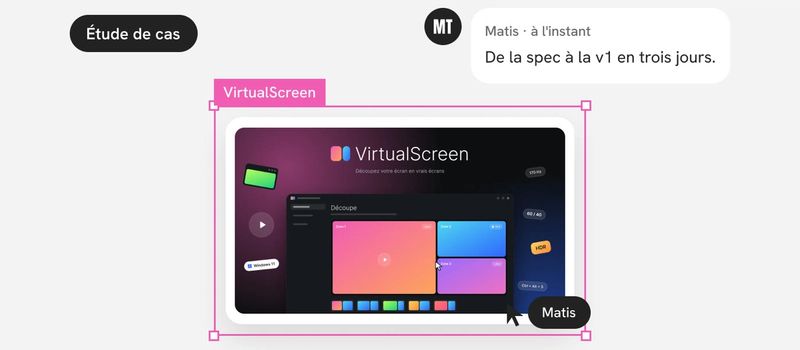
To Windows, an ultrawide screen is still a single screen: you can’t put an app in full screen in just one part of it. VirtualScreen splits it into real virtual screens, on Windows 11. From the first spec to version 1.0, it took three days.
The problem: a big screen is still a single screen
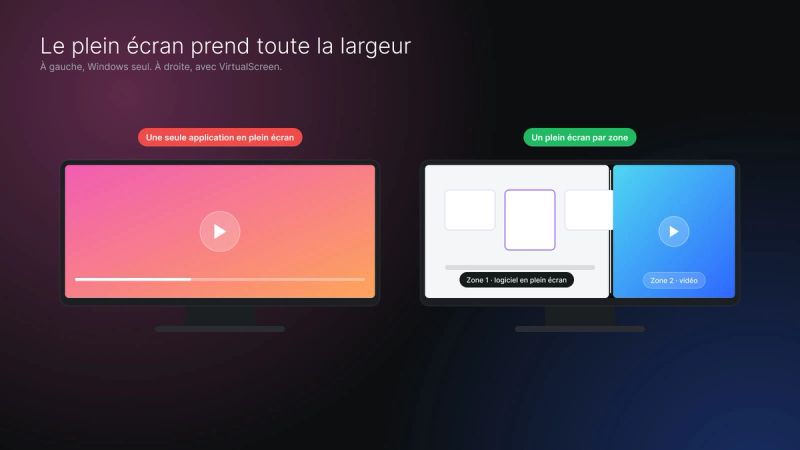
Ultrawide monitors, large TVs, laptops plugged into a monitor: they all offer more room than an app needs. Yet to Windows, a screen is a screen. Full screen in an app, a video or a game takes the whole surface.
The need fits in one sentence, written in the very first spec: any app must behave in a zone exactly as it would on a separate screen. A maximized work app, a full-screen video, a game in exclusive full screen.
Existing solutions don’t cover this case for everyone. The Windows features that come close are reserved for the Enterprise and Pro for Workstations editions. NVIDIA’s equivalent tool isn’t available on GeForce cards.
So VirtualScreen targets any screen, on a desk or in a living room, alone or alongside others.
Framing: four workstreams before the first line of code
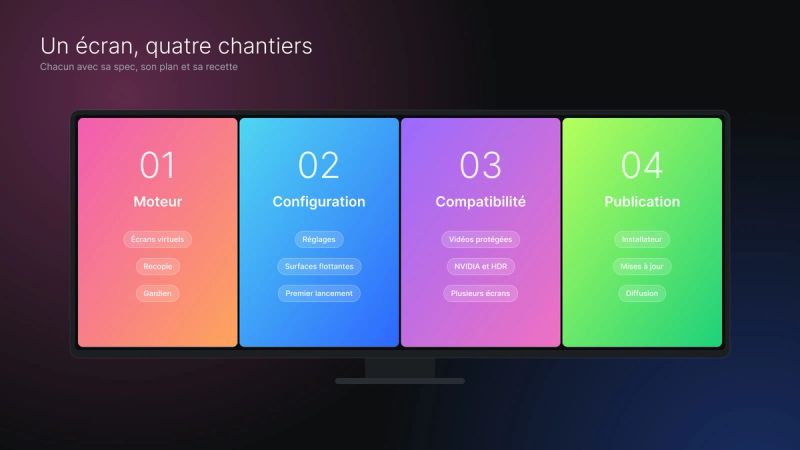
Before the first line of code, the product was split into four workstreams. Each one has its spec, its plan and its acceptance testing:
- the engine, which creates the screens and copies the image;
- the settings: preferences, floating surfaces, first launch;
- compatibility: protected videos, NVIDIA cards and HDR, multiple screens;
- the release: installer, updates, distribution.
The engine had a deliberately narrow scope: freely sized columns, a default 60/40 split, a keyboard shortcut and a guardian against black screens. The interface, HDR, other graphics cards and the installer were explicitly out of scope.
Three decisions held for the whole project:
- One reference machine first. The engine is validated on a single setup, a 3440 × 1440 screen at 170 Hz. Compatibility waits for its own workstream.
- State the limits in the spec. One frame of latency, every zone at the physical screen’s refresh rate, one to two seconds of black at each switch: listed and accepted before coding.
- Free first. The release sticks to what costs nothing. Licenses and payment will come later.
The success criteria were measurable: at most one added frame of latency, no visible stutter, never more than five seconds of black screen.
Art direction and Figma mockups
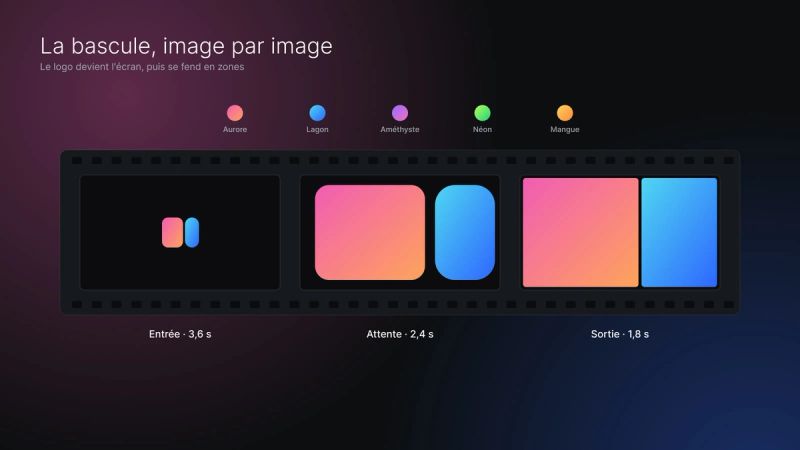
Everything was designed in Figma before being coded, in light and dark themes. The art direction comes down to a few rules:
- a neutral app background, with color reserved for cards;
- one gradient per zone (Aurora, Lagoon, Amethyst, Neon…) to recognize each screen at a glance;
- glass labels placed on the zones;
- a single typeface, Inter, and one shared animation curve;
- respect for the “reduce motion” setting.
Figma variables are exported automatically as CSS tokens. The coded interface therefore uses exactly the colors, spacing and radii of the mockups.
The key screens: settings (split, general, about), the tray menu, the four-step first launch, the full-screen editor and the installer.
One animation took more work than the others: the switch. Windows takes one to three seconds to change displays, and the screen goes black. The animation covers that moment: the logo becomes the screen, then splits into zones. Several versions were compared in Figma. The split plays before the display change: played after, it fell into the black.
Architecture: an IddCx driver, C++20 and WebView2
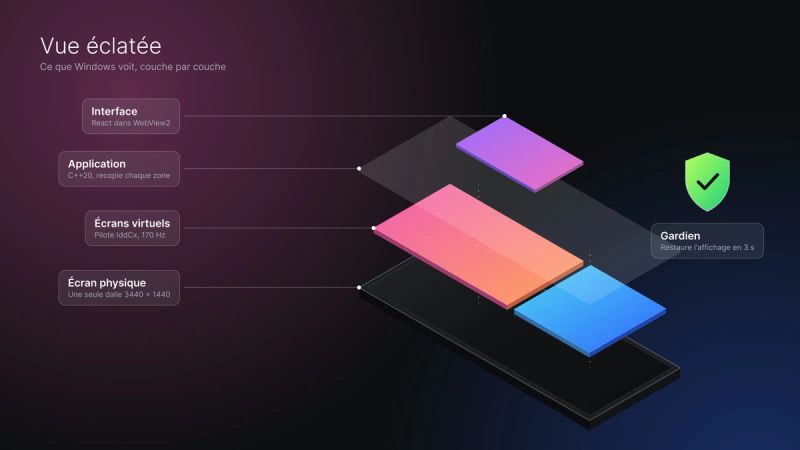
VirtualScreen rests on four building blocks:
- a virtual display driver (UMDF, IddCx), derived from an MIT-licensed open source project. It creates the virtual screens at the physical screen’s exact refresh rate;
- the app, in C++20, which drives the split and copies each zone onto the real screen;
- a guardian, a separate process that restores the display if the app stops responding;
- the interface, in React and TypeScript, displayed in WebView2.
The app and the driver exchange simple messages: add a screen, remove it, and a heartbeat every 1.5 seconds. The interface talks to the app through a versioned JSON bridge.
Why these choices:
- A testable core. The logic depends on no Windows graphics API: it can be fully tested with test doubles.
- Capture rather than shared frames. The spec planned to share frames between the driver and the app. A probe showed a risk of failure. Native Windows capture replaced it: 170 frames per second with no loss, under a millisecond of copying per zone.
- A golden rule against black screens. Three successive safety nets: the guardian within three seconds, then the driver alone within five, then a restore at startup.
- WebView2 for the interface. It reuses React and the tokens from Figma, in a locked window with no external navigation.
Working with Claude Code: spec, plan, code, testing
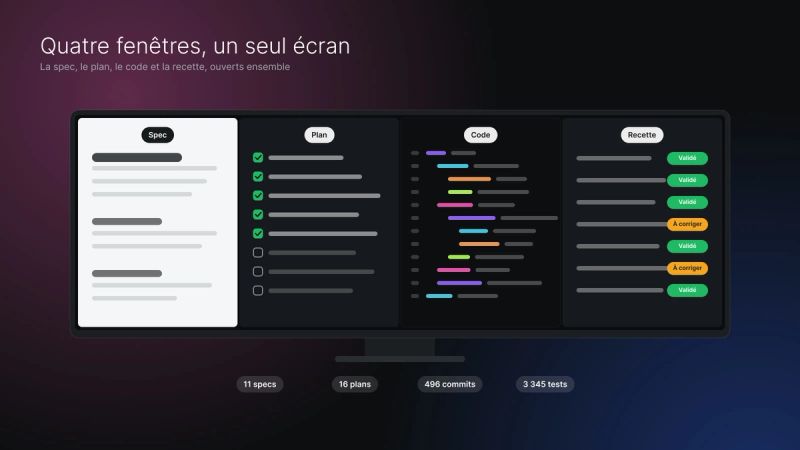
The code was written by Claude Code, under my direction. The method is the same for every workstream: a spec, a plan, the implementation, then acceptance testing.
In total: 11 specs, 16 plans and 5 investigations with probes, small programs that check a hypothesis before building on it.
Testing was done with test sheets, one task at a time. I tested on the real screen, replied “approved” or “to fix”, and fixes arrived as the feedback came in.
A few numbers:
- 496 commits from October 7 to 13, 2026;
- 3,345 automated tests before version 1.0 (1,883 for the engine, 1,462 for the interface);
- a build that rejects the slightest warning.
The split of roles stayed clear. Product and design decisions were mine: the rhythm of the animations, splitting several screens at once, the custom installer, releasing 1.0 directly. So was approving the mockups and the testing. Claude Code produced the specs, the plans, the code, the tests and the root cause analyses.
Even the release keeps a human step: continuous integration only prepares a draft. The version is published only after a check in a virtual machine.
The hard decisions
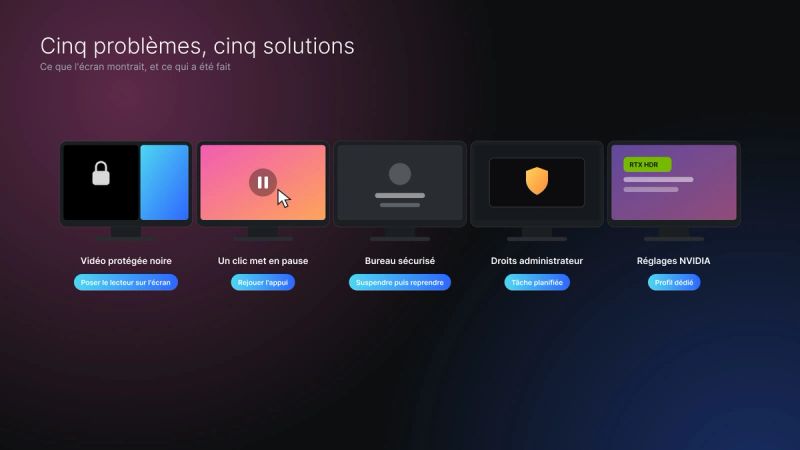
Protected videos stayed black. Windows blacks out protected content in any copy of the image: it can’t be copied into a zone. The solution copies nothing. The player window sits directly on the physical screen, and the copy layer is cut open at that spot. Version 1.0.1 then fixed apps wrongly taken for videos.
A click paused the video. In the browser, in full screen, a click only paused the video. The cause was found by reading Chromium’s code: the window repositioned itself across the whole screen between press and release. The fix replays the press at the right place.
The secure desktop. The lock screen and User Account Control screens can’t be copied. Rather than forcing it, the split pauses during those screens and comes back on its own.
Administrator rights. Windows launched as administrator escaped the app. Two options: a special manifest, or a scheduled task with elevated rights. The scheduled task won, with no permission prompt at each launch.
NVIDIA settings. Some card settings (RTX HDR, Vibrance, frame limiters) applied to the copy layer, which the driver mistook for a game. The solution: a profile dedicated to VirtualScreen alone. The user’s global profile is never changed.
Outcome and next steps
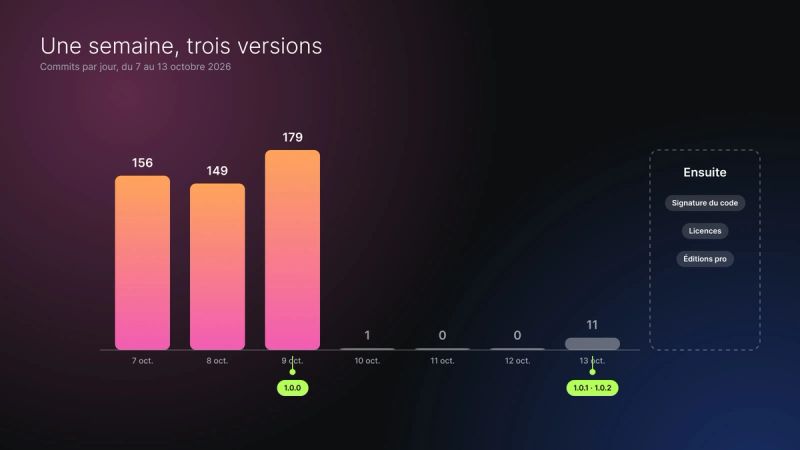
Version 1.0.0 shipped on October 9, 2026, followed by versions 1.0.1 and 1.0.2 on the 13th. The installer is free, available on GitHub, in French and English, for Windows 11.
Updates are offered, never forced. They are signed and verified, and the app rolls back to the previous version on its own if the new one doesn’t start within a minute.
The limits are stated in black and white:
- the installer isn’t signed by a recognized authority yet, hence the Windows warning on first launch;
- no variable refresh rate (G-Sync, VRR) in the zones;
- about one extra frame of latency while playing a protected video.
The next steps are already written: code signing, licenses and a mode for professional editions of Windows.